Who Developed GFPGAN? TencentARC, Downloads, and Running It on Replicate
Who built GFPGAN, where to download the model weights, and how to run it on Replicate without installing Python or owning a GPU.

GFPGAN is one of the most downloaded AI face restoration models ever built. But a lot of people who use it every day have never heard the name behind it — TencentARC.
This article covers everything you need to know:
- Who exactly built GFPGAN
- Where to find the official TencentARC/GFPGAN repository
- How to download GFPGAN model weights
- How GFPGAN works as a photo restoration and image enhancer
- How to run TencentARC GFPGAN on Replicate in minutes
Whether you want to use the browser tool, run it in the cloud, or download the model weights for local use — this guide covers all your options.
Who Developed GFPGAN?
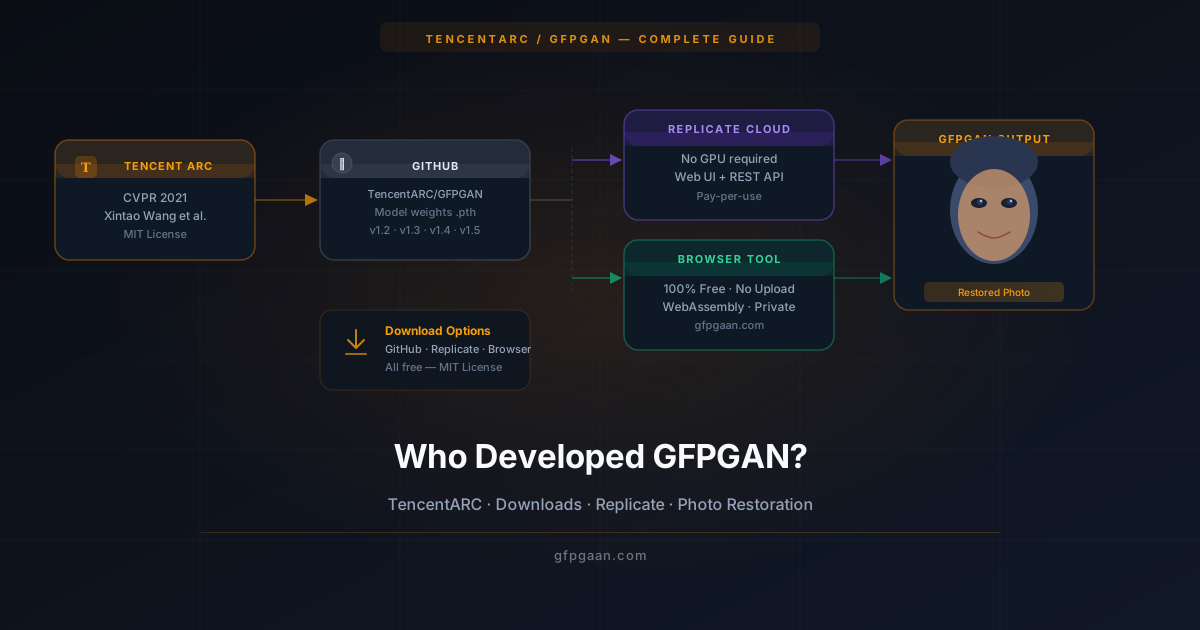
GFPGAN was developed by a team of researchers at Tencent ARC — the Applied Research Center of Tencent, one of the largest technology companies in the world. The core team behind the model was:
- Xintao Wang — lead researcher, also known for work on Real-ESRGAN and BasicSR
- Yu Li — researcher at Tencent ARC
- Honglun Zhang — researcher at Tencent ARC
- Ying Shan — senior researcher and project lead at Tencent ARC
The paper was titled “Towards Real-World Blind Face Restoration with Generative Facial Priors” and was accepted at CVPR 2021 — one of the most respected computer vision research conferences in the world. CVPR acceptance is highly competitive, which speaks to the quality and originality of the work.
The team published GFPGAN as open-source software, with the code and trained weights available publicly. The exact terms are stated in the LICENSE file of the official repository — check it directly before building anything commercial on top of the model, since licence terms for the code and for individual pretrained weights are not always identical.
Since its release in 2021, GFPGAN has:
- Become one of the most widely deployed open-source face restoration models, bundled into Stable Diffusion WebUI and available on Hugging Face and Replicate
- Been widely cited in subsequent blind-face-restoration research (see the paper on arXiv)
- Been integrated into Stable Diffusion WebUI, ComfyUI, and dozens of other tools
- Spawned multiple follow-up models from other research groups
The lead researcher, Xintao Wang, has since continued to work on related projects including Real-ESRGAN (a general-purpose image upscaler) and CodeFormer contributions, making Tencent ARC one of the most influential labs in practical AI image restoration.
What Is the TencentARC/GFPGAN Repository?
The official home of GFPGAN is the TencentARC/GFPGAN repository on GitHub. You can find it by searching “TencentARC GFPGAN” on GitHub or going directly to the repository under the TencentARC organization.
The repository contains:
- The full model source code written in Python (PyTorch)
- Pre-trained model weight files for GFPGAN v1.2, v1.3, v1.4, and the unofficial community v1.5
- Inference scripts to run restoration from the command line
- A training script if you want to fine-tune the model on your own data
- Detailed installation instructions for Windows, macOS, and Linux
- A colab notebook for running GFPGAN in Google Colab without local setup
The repository is actively maintained and has thousands of GitHub stars, making it one of the most starred face AI projects on the platform.
GFPGAN Model Versions
The repository offers four main model versions, each with different trade-offs:
| Version | Output Size | Best For | File Size |
|---|---|---|---|
| GFPGAN v1.2 | 512 px | Fast preview, mild damage | ~332 MB |
| GFPGAN v1.3 | 512 px | Balanced — preserves more original character | ~332 MB |
| GFPGAN v1.4 | 1024 px | Recommended default — high fidelity | ~332 MB |
| GFPGAN v1.5 | 1024 px | Maximum detail recovery (community) | ~332 MB |
For most GFPGAN photo restoration tasks, v1.4 is the best starting point. It outputs at 1024 pixels with very high identity fidelity and handles the widest range of damage types well.
How to Download GFPGAN
You have three main options, depending on what you want to do.
Option 1 — Use It Free in Your Browser (No Download Needed)
The fastest way to run real GFPGAN with no download and no Python is the hosted Replicate endpoint or the official Hugging Face Space. Both execute the actual model on a server GPU, which does mean your image is uploaded — so use a photo you are comfortable sending.
This is the best option for:
- Restoring individual photos quickly
- Trying GFPGAN before committing to a local setup
- Anyone who does not want to deal with Python environments
Option 2 — Download from GitHub (Local Setup)
To download and run GFPGAN locally, follow these steps:
1. Clone the repository
git clone https://github.com/TencentARC/GFPGAN.git
cd GFPGAN
2. Install dependencies
pip install basicsr facexlib realesrgan
pip install -r requirements.txt
python setup.py develop
3. Download a model weight file
Go to the Releases section of the TencentARC/GFPGAN repository and download the .pth model file for the version you want. Place it in the experiments/pretrained_models/ folder.
4. Run inference
python inference_gfpgan.py -i inputs/whole_imgs -o results -v 1.4 -s 2This restores all images in the inputs/whole_imgs folder and saves results to the results folder. The -s 2 flag upscales the background by 2× using Real-ESRGAN.
For a full walkthrough, see our GFPGAN installation guide.
Option 3 — Run on Replicate (Cloud, No Local Setup)
Replicate lets you run GFPGAN in the cloud — no Python, no GPU required. We cover this in detail in the section below.
GFPGAN as a Photo Restoration Tool
When most people say GFPGAN photo restoration, they mean using it to fix old or damaged portrait photos. This is genuinely one of the best use cases in all of AI image processing.
GFPGAN photo restoration works because the model was specifically trained on face images. It does not just sharpen pixels — it rebuilds face detail using a generative facial prior derived from StyleGAN2. This is what separates it from basic sharpening filters or general upscalers.
What GFPGAN restores in photos:
- Old family prints — film grain, faded colors, scan artifacts, low dynamic range
- Blurry portraits — motion blur, focus blur, camera shake
- Compressed images — JPEG block artifacts from heavy lossy compression
- Low-light shots — high-ISO grain and color noise from dark indoor photos
- Pixelated crops — small face regions from group or wide-angle shots
- Black and white scans — noise, low contrast, and soft detail in archival prints
The restoration happens in four stages: face detection → degradation encoding → generative prior injection → blending back into the original image. The entire pipeline runs in under two seconds in the browser and under one second on a local GPU.
Want to see actual results across all these photo types? Check out our GFPGAN Before & After Examples (2026) with real metrics.
GFPGAN as an Image Enhancer
GFPGAN is often called a GFPGAN image enhancer — and while that description is accurate, it is important to understand what kind of enhancement it does.
GFPGAN enhances faces specifically. It is not a general-purpose image enhancer like Real-ESRGAN or Topaz Photo AI. It will not sharpen a landscape, improve a product photo, or fix a blurry dog. It targets human facial regions only.
Within that scope, it is exceptional. Here is what makes GFPGAN stand out as a face image enhancer:
Natural results, not artificial ones. Basic sharpening makes edges pop but introduces halos and artifacts. GFPGAN reconstructs from real face knowledge — the result looks like it was always a good photo.
Identity-preserving enhancement. Other enhancement tools can make a face look sharper but also make it look like a different person. GFPGAN is trained and evaluated with identity distance as an explicit objective, which is why the enhanced face usually still reads as the same person, just clearer.
Works on severely degraded input. Most image enhancers fail on truly damaged photos. GFPGAN was designed specifically for blind face restoration — where the type and level of damage is unknown. This makes it far more useful in real-world photo restoration scenarios.
Pairs well with Real-ESRGAN. For full-image enhancement, the recommended workflow is: GFPGAN for the face regions first, then Real-ESRGAN for the background and full image. This two-pass approach gives you complete, polished results.
How to Run TencentARC GFPGAN on Replicate
Replicate is a cloud platform that lets you run AI models through a web interface or API — without installing anything on your computer. It is one of the most popular ways to run TencentARC GFPGAN without dealing with Python environments or GPU requirements.
Step 1 — Find GFPGAN on Replicate
Go to replicate.com and search for “GFPGAN” or “TencentARC”. You will find the official GFPGAN model listed under the TencentARC organization. The model page shows example outputs, input parameters, and the API documentation.
Step 2 — Create a Free Account
Replicate requires a free account to run models. Sign up at replicate.com — you get a small amount of free compute credit to get started.
Step 3 — Upload Your Photo and Set Parameters
On the GFPGAN model page, you will see an input panel on the left side. The key parameters are:
- img — upload your photo here (JPG or PNG)
- version — choose your model version (v1.4 recommended)
- scale — upscaling factor for the background (2 is standard)
- codeformer_fidelity — if the Replicate version includes CodeFormer blending, set this between 0 and 1 (higher = more faithful to original, lower = more AI reconstruction)
Step 4 — Click Run
Hit the Run button. Replicate queues your job and typically processes it within a few seconds to a few minutes depending on server load. The result appears on the same page as a downloadable image.
Step 5 — Download Your Result
Click the output image to download it in full resolution. Replicate also shows you the processing time and resource usage.
Running GFPGAN on Replicate via API
For developers who want to build GFPGAN into an application, Replicate provides a clean REST API. Here is the basic structure in Python:
import replicate

output = replicate.run(
    "tencentarc/gfpgan:9283608cc6b7be6b65a8e44983db012355f829a",
    input={
        "img": open("your-photo.jpg", "rb"),
        "version": "v1.4",
        "scale": 2
    }
)

print(output)
The response includes a URL to the restored image hosted on Replicate’s CDN. You can download it or pass it directly to another step in your pipeline.
Replicate Costs
Replicate charges by compute time. GFPGAN typically costs a fraction of a cent per image on Replicate’s hardware. For individual use, the free credits are usually enough for testing. For production use with high volume, costs add up — the browser tool or local setup would be more economical.
Which Option Is Right for You?
Here is a quick summary to help you choose:
| Use Case | Best Option |
|---|---|
| Restore one or two photos quickly | Free browser tool on this site |
| Privacy-sensitive images | Free browser tool (zero upload) |
| Batch processing many photos | Local setup (GitHub download) |
| API integration in an app | Replicate API |
| Testing without any setup | Replicate web interface |
| Full control over pipeline | Local GitHub clone |
For most people, the free browser tool is the fastest and most private option. No account. No download. No image ever leaves your device.
Try GFPGAN Free — Right Now
No Download. No Replicate Account. Just Upload and Restore.
Runs entirely in your browser. 100% private. Nothing leaves your device.
Restore a Photo Free →Related Guides
- What Is GFPGAN? Complete Guide — Full explanation of how GFPGAN works, what it restores, and its limitations.
- How to Install GFPGAN on Windows, Mac & Linux — Step-by-step local setup guide with screenshots.
- GFPGAN Face Restoration: Before & After Examples (2026) — Real results with PSNR/SSIM metrics across six photo types.
- CodeFormer vs GFPGAN: Which Is Better? — Deep comparison of the two leading face restoration models.
- Best AI Face Restoration Models: GFPGAN, CodeFormer, GPEN — Full three-way model comparison.
- Face Restoration Guide — the broader concept explained, with links into every related guide.
- Face Restoration in Automatic1111 & ComfyUI — enabling GFPGAN inside a Stable Diffusion workflow instead of running it standalone.
- Best AI Face Restoration Tools & Apps — how the GitHub/Replicate route compares to other free and paid options.
Frequently Asked Questions
Who made GFPGAN?
GFPGAN was developed by Xintao Wang, Yu Li, Honglun Zhang, and Ying Shan at Tencent ARC (Applied Research Center). It was published at CVPR 2021. The official code is maintained in the TencentARC/GFPGAN repository on GitHub; see its LICENSE file for the governing terms.
Where can I download GFPGAN?
You can download GFPGAN from the official TencentARC/GFPGAN GitHub repository. The model weight files (.pth) are available in the Releases section. Alternatively, use the free browser tool on this site — no download required — or run it via the Replicate cloud platform.
Is GFPGAN free to download and use?
GFPGAN is open-source and free to download and run, with no licence fee. Whether your specific use — particularly a commercial one — is permitted depends on the terms in the repository’s LICENSE file, and on the licences attached to the individual pretrained weights and to the dependencies GFPGAN pulls in. Read those directly rather than relying on a summary; note that some models commonly used alongside GFPGAN carry non-commercial restrictions.
What is the difference between GFPGAN v1.3 and v1.4?
GFPGAN v1.4 outputs at 1024px (vs 512px for v1.3) and has higher identity fidelity. v1.3 sometimes preserves more of the original character in moderately damaged photos, while v1.4 produces more aggressive and detailed reconstruction. For most users, v1.4 is the recommended default.
How do I run GFPGAN on Replicate for free?
Sign up for a free account at replicate.com, find the TencentARC/GFPGAN model, upload your photo, and click Run. Replicate gives you free compute credits when you sign up, which is enough to test the model on several photos. Each image typically takes a few seconds to process.
Can I use the Replicate API to build an app with GFPGAN?
Yes. Replicate provides a REST API and official Python, JavaScript, and Node.js clients. You can call the TencentARC/GFPGAN model programmatically and integrate face restoration into your own application. Replicate charges by compute time, so costs scale with your usage volume.