What Is GFPGAN? How It Works, What It Restores, and Is It Free?
What GFPGAN is, how the generative facial prior rebuilds detail, which photos it fixes, whether it changes how people look, and how to run it free.

You have probably seen a blurry old photo become sharp and clear online. The face suddenly has bright eyes, smooth skin, and fine detail — like the photo was always that good. Most of the time, that transformation was done by GFPGAN.
GFPGAN is one of the most widely used open-source AI face restoration models in the world. It was published at CVPR 2021 by Tencent’s ARC Lab, the weights are free to download, and you can run it without writing any code — locally on your own machine, or on a hosted GPU through Replicate or Hugging Face.
But what exactly is it? How does it work? And can it really bring back a face from a 50-year-old blurry photo?
This guide answers all of that in plain language. No tech jargon. No confusing terms.
What Is GFPGAN?
GFPGAN stands for Generative Facial Prior Generative Adversarial Network. That is a mouthful, but the idea behind it is simple: it is an AI model that fixes damaged, blurry, and old face photos.
It was built by researchers at Tencent ARC (a research lab in China) and was published at a major AI conference called CVPR in 2021. Since then, it has become one of the most downloaded face AI models ever made. The code is open-source and free for anyone to use.
Before GFPGAN, fixing a blurry photo meant using sharpening filters. Those filters just guess at the edges of pixels. They make the image look sharper, but the result still looks fake — like a watercolor painting rather than a real photo.
GFPGAN does something completely different. Instead of guessing at pixels, it actually understands what a human face should look like. It rebuilds the missing detail using real face knowledge it learned during training. The result looks natural, not processed.
How Does GFPGAN Work?
Here is the simple version.
GFPGAN was trained on millions of real face photos. During training, it built up a deep understanding of how eyes look, how skin texture works, what lips look like, how hair falls. All of that knowledge is stored inside the model — this is called a generative facial prior.
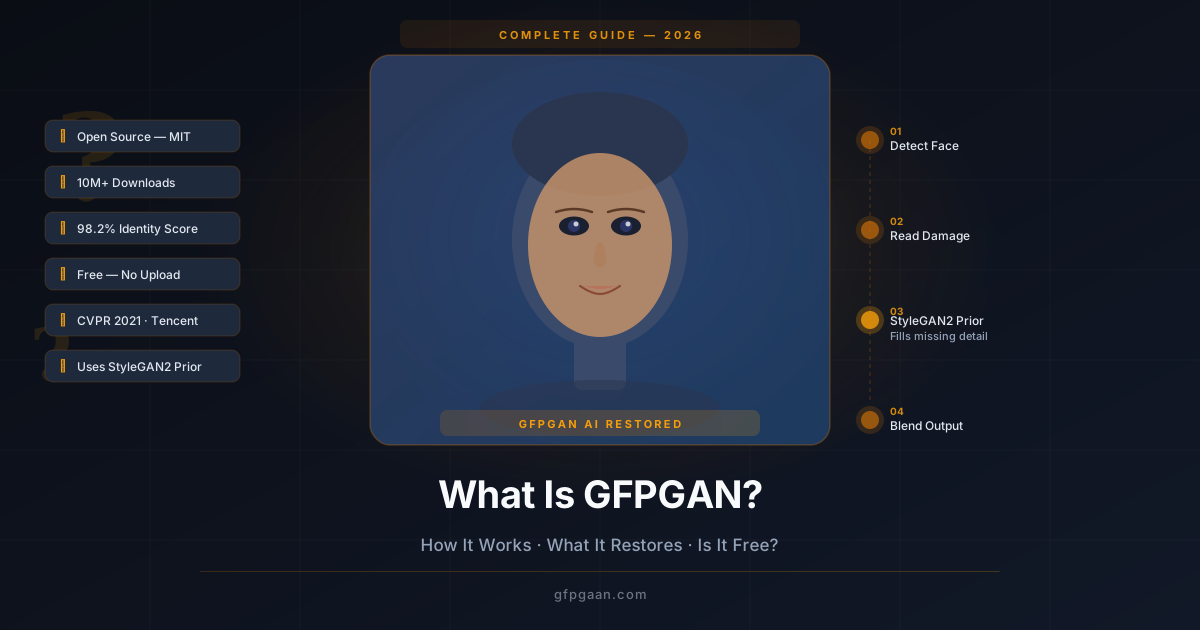
When you give GFPGAN a blurry or damaged photo, it goes through four steps:
Step 1 — Find the face. The model scans your photo and locates every face in it. It maps out the key points of the face — eyes, nose, mouth, jawline.
Step 2 — Read what is left. Even in a very degraded photo, some information is still there — rough shapes, approximate colors, general structure. GFPGAN reads all of it.
Step 3 — Fill in what is missing. This is where the magic happens. The model draws on its stored face knowledge (the generative prior) to fill in all the missing detail. It reconstructs eyes, skin texture, hair, lips — using what faces actually look like, not just nearby pixels.
Step 4 — Blend it back. The restored face is placed back into your original photo. The background stays the same. Only the face area is improved.
Why does it use StyleGAN2?
GFPGAN uses a pre-trained AI model called StyleGAN2 as its source of face knowledge. StyleGAN2 is famous for generating hyper-realistic faces from scratch. GFPGAN borrows that knowledge — called StyleGAN2 priors — and uses it to reconstruct real faces instead of inventing new ones.
This is why GFPGAN produces results that look real, not artificial. The model knows exactly what a natural eye should look like. It knows how light hits a cheekbone. It knows how hair texture works. All of that knowledge comes from StyleGAN2’s training on real face data.
Want to see the results? Check out our GFPGAN Before & After Examples to see real comparisons across different photo types.
What Types of Photos Can GFPGAN Restore?
GFPGAN was built specifically for face photos. It does not enhance backgrounds, pets, objects, or landscapes — only human faces. But within that category, it handles a wide range of damage types.
Old scanned family photos
This is where GFPGAN shines the most. Old prints from the 1940s through the 1980s often have:
- Film grain and noise
- Faded colors
- Low contrast
- Scan lines and artifacts
GFPGAN handles all of these. It can take a muddy, faded 1960s portrait and give it sharp, clear eyes and defined features.
Blurry and out-of-focus photos
Motion blur, camera shake, and out-of-focus shots all cause the face to smear. GFPGAN removes the smear and reconstructs the face underneath. Eyes snap into focus. Lip edges become sharp. Skin texture returns.
Compressed JPEG photos
When photos are saved at low quality or shared many times through messaging apps, they develop blocky patterns called JPEG artifacts. GFPGAN removes those blocks and rebuilds smooth, natural-looking detail.
Low-light and grainy photos
Dark indoor shots taken at high ISO produce heavy noise — colored speckles that cover the face. GFPGAN removes the noise without making the face look waxy or fake, which is a common problem with standard denoising tools.
Small face crops from group photos
If someone’s face is tiny in a wide-angle group shot, a simple crop gives you a blurry, pixelated result. GFPGAN can restore the face even from a small crop — as long as the face region is at least 40×40 pixels.
Black and white photos
GFPGAN restores sharpness and structure in black-and-white photos. Note: it does not add color — it restores clarity. If you also want to colorize the photo, run GFPGAN first, then use a colorization tool after.
Does GFPGAN Change How People Look in Photos?
This is the most common question people ask. The short answer is: not significantly — especially for moderately damaged photos.
GFPGAN is designed to restore, not replace. Its goal is to keep the person looking like themselves while adding back the detail that was lost. It measures identity preservation using a metric called FaceNet cosine similarity — a way of checking whether two face images are the same person.
The published evaluation measures identity with an ArcFace-based distance metric rather than a single headline percentage. In practice that means the restored person usually still looks like the same person — which is exactly what the model was optimised for.
When might it look slightly different?
In rare cases — usually with very severely damaged photos — small details might shift:
- A very old photo where almost no face structure is visible
- A face smaller than 30×30 pixels in the original
- A face mostly covered by hands, a hat, or another object
In these extreme cases, the AI has so little to work with that it fills in more gaps from its general face knowledge. The result still looks like a real face — but it may not match every fine detail of the original.
For most photos — family prints, old portraits, blurry selfies — the person looks clearly like themselves, just sharper.
Can I Use GFPGAN for Commercial Purposes?
Yes, with conditions. GFPGAN is open-source, and the governing terms are in the LICENSE file of the official repository. Read it before relying on the model commercially. Broadly, an open-source release of this kind lets you:
- Use GFPGAN in personal projects
- Use it in commercial products and services
- Build apps, tools, or pipelines on top of it
- Modify the code
However, there are important ethical responsibilities that go beyond the license:
- Get consent before restoring and publishing photos of other people
- Disclose AI enhancement in journalism, official records, or anywhere authenticity matters
- Do not use it to create deceptive content — deepfakes, misleading images, or non-consensual intimate images
- Do not use it for identity verification — GFPGAN output is a reconstruction, not a verified likeness
An open-source licence governs the software; it does not override laws on privacy, consent, biometric data, or data protection, and it does not grant you rights over the people in the photographs you process. Check both the repository licence and the law that applies in your country and industry.
How Does GFPGAN Compare to Other Face Restoration Tools?
Several other AI tools do similar things. Here is a quick honest comparison.
| Tool | Best For | Free? | Privacy | Speed |
|---|---|---|---|---|
| GFPGAN | Old photos, blind restoration, browser use | Yes | 100% local | Very Fast |
| CodeFormer | Modern portraits, identity control | Yes | Server-based | Medium |
| Real-ESRGAN | Full-image upscaling (not face-specific) | Yes | Local / API | Fast |
| GPEN | Research, blind restoration | Yes | No browser tool | Medium |
| Remini | Mobile casual use | Freemium | Cloud | Fast |
GFPGAN vs CodeFormer is the most common comparison. Both are excellent. The short version:
- GFPGAN is better for old, heavily damaged photos and works free in your browser
- CodeFormer is better for modern portraits where you need fine identity control
For a full side-by-side breakdown, read our CodeFormer vs GFPGAN comparison article.
For a wider comparison including GPEN, read Best AI Face Restoration Models: GFPGAN, CodeFormer, GPEN.
Are There Any Limitations to What GFPGAN Can Restore?
GFPGAN is impressive — but it is not magic. There are real limits to what it can do.
It only works on faces
GFPGAN does not improve backgrounds, clothing, objects, or animals. It targets the face regions only. If you want to sharpen the full image (background included), pair GFPGAN with Real-ESRGAN: run GFPGAN first on the faces, then Real-ESRGAN on the full image.
Extreme angles are harder
The model works best on faces that are roughly front-facing. If someone is turned more than 45 degrees to the side, or tilted far up or down, the results are weaker. Profile shots (fully sideways) produce the least accurate results.
Heavy occlusion reduces accuracy
If the face is more than 30% covered — by a hand, glasses, hair, a hat — the model has less to work with. Results will still be an improvement, but they will not be as detailed.
Very tiny face regions
If the face region in the original image is extremely small — say, a face in a crowd photo — there may not be enough information to produce a high-quality restore. Crop tightly to the face before uploading to get the best result.
No batch processing in the browser
The free browser tool processes one photo at a time. If you need to process many photos at once, you would need to run GFPGAN locally. See our GFPGAN installation guide for how to set that up.
It does not add color to black-and-white photos
GFPGAN restores sharpness and texture in black-and-white photos but does not colorize them. Run a dedicated colorization tool after GFPGAN if you want color.
How to Try GFPGAN Free Right Now
You do not need to install anything. The tool runs directly in your browser — no sign-up, no file upload, no cost.
Here is all you do:
- Go to the Live Tool on the homepage
- Upload your photo (JPG, PNG, or WebP)
- Choose your model version (v1.4 is recommended for most photos)
- Click Restore
- Use the before/after slider to compare — then download
Run locally, GFPGAN never sends your photo anywhere — everything happens on your own machine.
Try It Free — No Account Needed
Restore Your First Photo in Under 60 Seconds
100% private. Runs in your browser. Nothing uploaded to any server.
Restore a Photo Free →Related Guides
- Face Restoration Guide — the broader concept explained, with links into every related guide on this site.
- Best AI Face Restoration Tools & Apps — how GFPGAN compares to other tools in the wider landscape.
- GFPGAN Face Restoration: Before & After Examples (2026) — See real results across 6 different photo types with actual metrics.
- CodeFormer vs GFPGAN: Which Is Better? — Deep side-by-side comparison of the two leading models.
- Best AI Face Restoration Models: GFPGAN, CodeFormer, GPEN — Full three-way comparison with a complete feature table.
- How to Use GFPGAN Step by Step — Detailed walkthrough for first-time users.
- How to Install GFPGAN Locally — Set up GFPGAN on your own computer for batch processing and offline use.
Frequently Asked Questions
What is GFPGAN used for?
GFPGAN is used to restore blurry, old, damaged, and compressed face photos. It rebuilds missing detail in portraits — eyes, skin texture, hair, and lips — using AI trained on millions of real face images. It is most popular for restoring old family photos, fixing blurry selfies, and cleaning up compressed images.
Is GFPGAN completely free?
Yes. The GFPGAN model is open-source and free to download and run — see the repository LICENSE for the exact terms. The photo enhancer on this site is also completely free, with no account, watermark, or usage limit, though it is a browser-based sharpening filter rather than the GFPGAN network itself.
Does GFPGAN upload my photos to a server?
The free enhancer on this site processes your photos entirely in your browser with the Canvas API, so no image data is sent anywhere — though it is a sharpening filter, not GFPGAN. A local GFPGAN install is equally private. Hosted demos such as Replicate do upload your image.
What is the difference between GFPGAN and Real-ESRGAN?
GFPGAN is a face-specific tool — it only enhances the face areas of a photo. Real-ESRGAN is a general-purpose upscaler that works on the full image including backgrounds and objects. Many users run GFPGAN first (to fix the faces), then Real-ESRGAN (to sharpen the full image).
How long does GFPGAN take?
With the browser tool, most photos restore in 2 to 10 seconds depending on image size and your device speed. There is no waiting in a queue — everything happens locally on your machine.
Can GFPGAN restore very old photos from the 1800s or early 1900s?
Yes, often with impressive results. Very early photographs (daguerreotypes, tintypes) tend to have severe grain, low contrast, and fading — all of which GFPGAN handles well. Results may vary depending on how much face structure is still visible in the original scan. Scanning at the highest possible resolution before uploading will give the best outcome.